Give an AI access to your Odoo: the MCP module vs Make/Zapier, and what's safe
The Odoo MCP Server module is free — but not if you're on Odoo Online, and Odoo's docs say the Make/Zapier route needs the Custom plan. Read access wins; writes are the risk. Checked 25 Aug 2026.
Published 25 Aug 2026 · Facts checked 25 Aug 2026
The short answer: if you run your own Odoo, this is worth doing, and it's free.
I run this exact setup myself, so here's the version I'd give a friend over kopi. You install a free module, connect it to your AI assistant read-only, and then you just ask: who owes me money, what sold last month, what's running low? The answer comes straight off your own Odoo. Nothing's metered per question. Nothing leaves your server. And read-only means the AI genuinely can't change anything, because the edit tools aren't even offered to it.
One thing decides everything: where your Odoo lives. Odoo.sh or your own server (the free, open-source Community edition counts)? You're set. Odoo Online? Stop here. Odoo's own documentation says you can't install Apps Store modules there, and the Make/Zapier workaround needs the External API, which Odoo only sells on the Custom plan. Your hosting decides your option. Read-only decides your risk. That's the whole comparison, and the rest of this page is the receipts.
At a glance (checked 25 Aug 2026)
All prices in USD, as each vendor's own page displays them. Terms change, so click through to each vendor's page.
| Odoo MCP Server module | Make + Odoo | Zapier + Odoo | |
|---|---|---|---|
| Price | "FREE" to install on Odoo Apps (proprietary OPL-1 licence, not open source) | Free: "Up to 1,000 credits/mo"; cheapest paid plan US$10.59/mo billed monthly (US$9/mo billed annually), per Make's pricing page | Free: "100 tasks/mo"; Professional "$29.99"/mo billed monthly ("$19.99" billed annually), 750 tasks, per Zapier's pricing page |
| Your Odoo must be on | Odoo.sh or on-premise — Online "is incompatible with custom modules or modules from the Odoo Apps Store" | Any Odoo with External API — "only available on Custom Odoo pricing plans" | Same External API restriction |
| Reach into your data | 12 tools — 7 read, 5 write, across models you enable | 20 modules (Inventory, Batches, Leads), one of them a generic "Make an API Call" | 1 trigger, 2 actions: New Lead, Create Lead, Find Contact |
| Read-only lock | Yes — uncheck consent and you get mcp:read; "write tools are not even listed" | No — the key you paste "is equivalent to your password" | No — same key model |
| Cost per AI call | None — your server, your hardware | One credit per module action | Zapier MCP: "Each MCP tool call uses two tasks" |
| Who supports it | much. Consulting — "offices in Germany, Portugal and the United Kingdom" | Make | Zapier |
One conflict worth naming. The module's Apps-store availability table ticks Odoo Online, Odoo.sh and On Premise. Odoo's own administration docs say the opposite about Odoo Online. When a marketplace tile and the vendor's documentation disagree, believe the documentation. And if you're on Odoo Online, ask the publisher in writing before you spend anything.
What you're actually buying
The MCP module: a door, not a robot
MCP (Model Context Protocol) is a standard way for an AI app to call tools inside your systems. Claude, ChatGPT, Copilot, Cursor and others all speak it. The module turns your Odoo into one of those tool servers. It exposes twelve tools. Seven read (search_records, get_record, get_fields, list_models, aggregate_records and friends) and five write (create_record, update_record, delete_record, post_message, and an admin-only call_model_method).
Two things make it more grown-up than the demos suggest. First, the module's own page says "every call runs as a real Odoo user" and "Odoo ACLs and record rules always apply". So the AI can't see or do anything the user account behind it couldn't. Second, the consent screen has a checkbox: "Allow creating and modifying data". Uncheck it and the session gets the mcp:read scope, where "write tools are not even listed and any write attempt is refused". That's a real, enforced boundary. Not a prompt asking the model nicely.
And it's free to install. Worth spelling out, because the same store lists paid MCP modules from US$10.22 up to US$265.94 (flat figures, no monthly label). Two bits of small print. The module ships under Odoo's Proprietary Licence (OPL-1): free to run, not open source, so you can't fork it and you depend on its publisher. The platform under it, though, really can be free. Odoo Community is the free, open-source edition you self-host; Enterprise is the paid subscription you'd upgrade to. The module's only Odoo dependency is the core Discuss app, so a Community instance on your own VPS runs it with zero licence cost. Your real bill is a server and your time, not a subscription.
What it does for a small business owner
"Connect an AI to your ERP" sounds abstract until you see it. Here's the concrete payoff. You ask, in plain English, the questions you currently build a report for, or never get round to:
- "Which ten customers owe me the most, and how overdue?"
- "What did we sell last month versus the same month last year?"
- "Which products are below their reorder point?"
- "Every unpaid invoice past 60 days, grouped by salesperson."
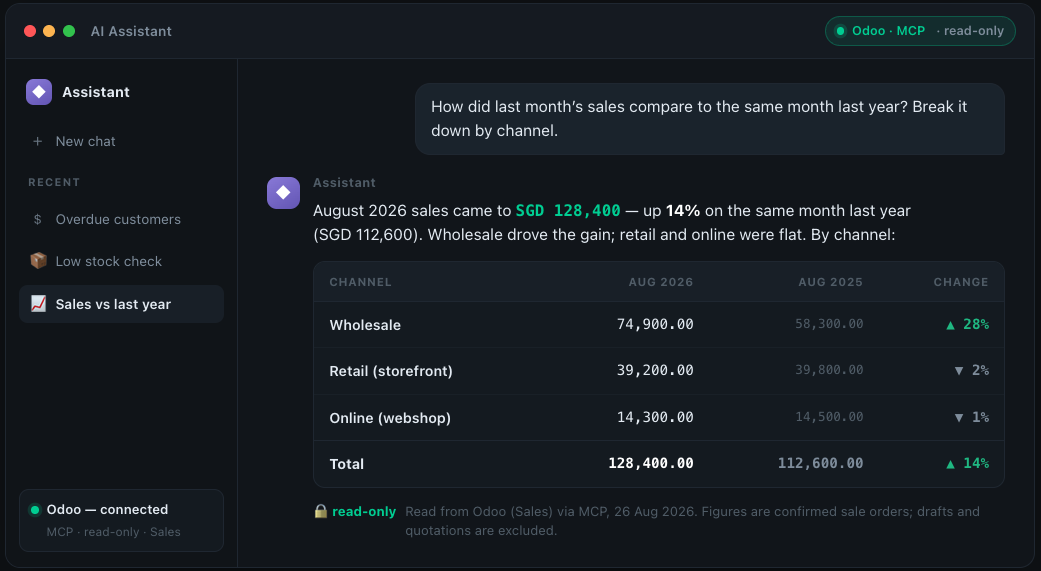
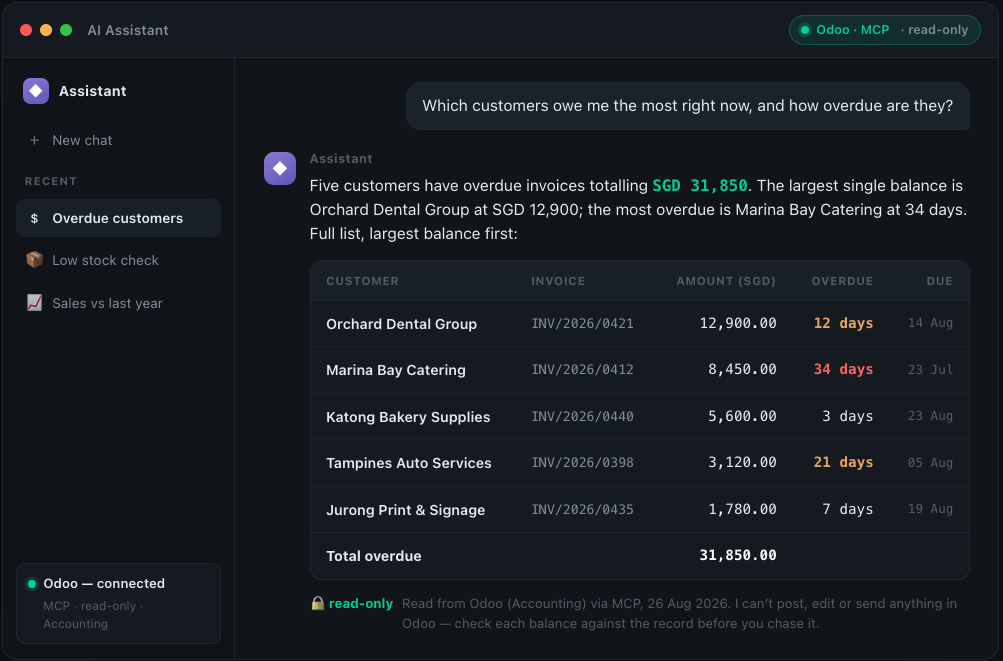
Here's what that looks like from the user's side. Three questions, each answered from a live Odoo over the read-only MCP connection:
Overdue receivables, ranked by balance — read from Odoo (Accounting). Illustrative mockup; fictional names and figures.
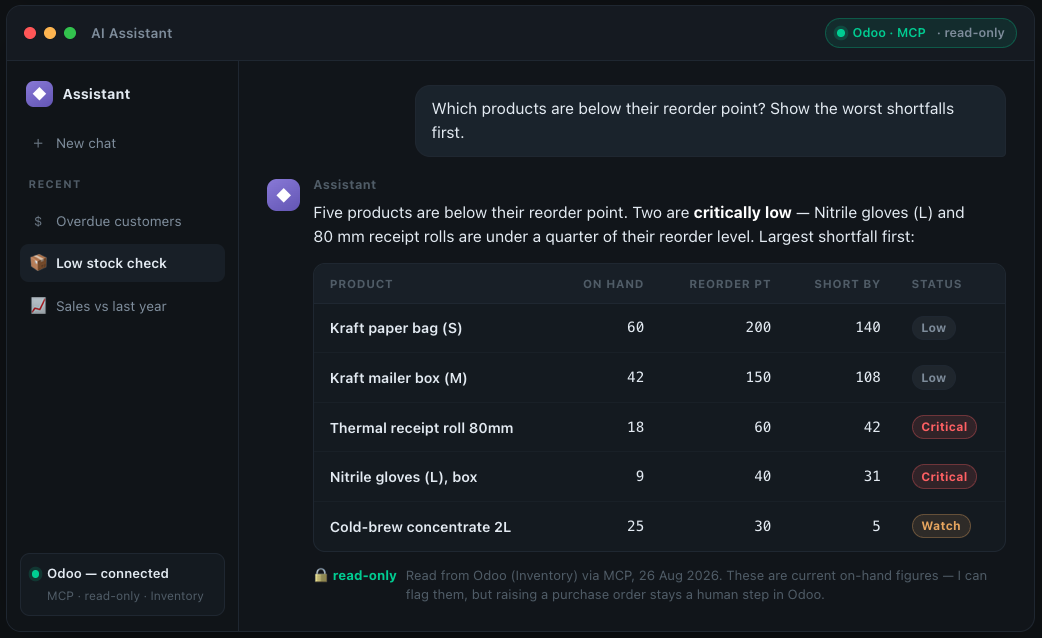
Products below their reorder point — read from Odoo (Inventory). Illustrative mockup; fictional data.
Last month's sales versus a year ago, by channel — read from Odoo (Sales). Illustrative mockup; fictional data.
The read tools doing this (search_records, get_record, aggregate_records) do the same searching and totalling a report would. You just drive them with a sentence, then follow up ("now only the West region", "now as a monthly trend") without ever opening a pivot view. If you've got no finance team and no time to learn Odoo's filter-and-group-by machinery, that removes two waits at once: the wait for someone to build the report, and the need to build it yourself. Where it really pays off is the one-off questions that were never worth a saved view. Which is most of them. It runs on the AI subscription you already pay for, against live data, and nothing gets exported to a spreadsheet that's stale the moment you save it.
Two limits, though. It reads only what the Odoo user behind it may read, and every answer is only as current as your Odoo. And you check its numbers until a given question has earned your trust, because a confident wrong total is worse than no answer. This is a reporting assistant that saves you the report-building. It's not an oracle you stop checking.
Make and Zapier: the same reach, none of the gate
Both platforms talk to Odoo over its External API. Make's Odoo app wants your hostname, your database name, and "either the API key you copied in the section above, or the password you use to log in". Odoo's docs are blunt about what that key is: "it is equivalent to your password".
That matters more than it sounds. Make's Odoo app ships 20 modules, and one of them is a generic "Make an API Call". There's no read-only scope to uncheck. Whatever that key can do, an AI step in your scenario can do. Zapier's Odoo CRM app has the opposite problem: one trigger and two actions. Nowhere near enough to answer "what did we sell last quarter".
Zapier does have its own MCP server, included "on all Zapier plans", where "Each MCP tool call uses two tasks from your plan's quota". On the free 100-task tier that's 50 AI calls a month. A meter on curiosity.
The decision-flips
- Hosting decides your menu. Odoo Online can't install the module and needs the Custom plan for the API. Odoo.sh and on-premise can do either.
- Only one option can be locked read-only. The module's
mcp:readscope has no equivalent in a pasted API key. - Only one option is unmetered. Credits and tasks price your questions. Your own server doesn't.
Singapore-specific notes
- Write access has an IRAS edge here that it doesn't have elsewhere. Under the GST InvoiceNow Requirement, "GST-registered businesses are required to use InvoiceNow-Ready Solutions to transmit invoice data directly to IRAS for tax administration", phased "From 1 November 2025" for newly incorporated voluntary registrants, "From 1 April 2026" for all new voluntary registrations, and from "1 Apr 2028" through "1 Apr 2031" for everyone else by turnover band. So an AI that posts a wrong invoice in your Odoo isn't just a bookkeeping slip you quietly reverse. Depending on your phase, that data is on its way to IRAS. It's the single strongest argument for read-only. (Which tools actually transmit.)
- PDPA: self-hosting keeps the transfer question from coming up. Section 26(1) of the PDPA "provides that an organisation must not transfer any personal data to a country or territory outside Singapore except in accordance with requirements prescribed under the PDPA to ensure that organisations provide a standard of protection to personal data so transferred that is comparable to the protection under the PDPA". Odoo on your own Singapore VPS with the module installed keeps customer records where they are. The limit: the AI client is still an overseas service, and the records it reads land in its context. Read-only shrinks that surface. It doesn't remove it.
- Support runs on European hours. The publisher lists "offices in Germany, Portugal and the United Kingdom". No Singapore presence, no SGT support window. Plan for that when something breaks on a Monday morning.
- Not grant territory. A free module and a self-serve Make or Zapier subscription aren't the shape of thing grants fund. See the grant-path reality and /grants before anyone quotes you an "AI ERP integration" package.
- Billing is in USD on Make and Zapier, so add FX and GST on imported services to both.
Which one for which business
- Odoo.sh or self-hosted, and you want reports: the free module, read-only. This is the clean win and it costs nothing.
- Odoo Online: neither, for now. You'd be upgrading to the Custom plan to buy a worse version of this. Wait.
- You already run Make for other chores: you can reach Odoo today. But treat that API key as a password, and put the AI step before a human, not after.
- You want an AI to actually execute transactions: read the next section twice. Then do it in a staging database first.
- Zapier only: the Odoo CRM app's three operations won't carry a reporting use case. Compare Make and Zapier properly before you pick a platform for this.
- Comfortable with Docker and a VPS: you're the reader this module was built for. (Same territory as self-hosted n8n.)
What happens if you let it write?
Anthropic's own documentation for connecting Claude to remote MCP servers says: "Malicious MCP servers may include hidden instructions that try to make Claude perform unintended actions", "Only connect Claude to servers built and hosted by organizations and applications you trust", and "Review Claude's tool approval requests carefully and only click 'Allow always' when using a server and tool that you trust to run unsupervised". The MCP specification itself says "Hosts must obtain explicit user consent before invoking any tool" and that tool descriptions "should be considered untrusted, unless obtained from a trusted server".
Now picture a write-enabled ERP connection. The AI reads a customer email or a supplier PDF. That text can contain instructions. The model has create_record and update_record in its hands. And Odoo has no undo button for a posted journal entry. The module's own docs also warn that custom tools "bypass a model's Allow Read/Create/Write/Delete flags". The guardrails are real, and they have edges.
None of this makes write access unusable. It makes "Allow always" the wrong click. Custom connectors are available on Claude "Free, Pro, Max, Team, and Enterprise plans", with free users "limited to one custom connector", so you can try this at zero cost before deciding anything.
A practitioner note, with the boundary drawn. I run this exact setup in production internally: the MCP module feeding a self-hosted AI agent, connected read-only, answering the kinds of questions above against a live Odoo. So the connect-and-use side of this page is lived, not guessed. It sits on top of my day job writing custom Odoo v17 modules and running self-hosted Docker stacks. Two limits stay in place, though. Any interface screens on this page are illustrative mockups with fictional data, because the real instance holds live business records I won't publish. And per how we research, the vendor facts here (prices, licences, capabilities) remain desk research against the Sources list. Nothing on this page wears a Tested badge yet. That waits for a run you can inspect, not just take my word for.
One more install reality: a module is a dependency you now own. It's published for 16.0 through 19.0, and every Odoo major version is a migration. A module that lags a release leaves you choosing between the module and the upgrade. Free to install isn't free to keep.
You might need neither if…
…you ask your Odoo fewer than about five ad-hoc questions a month, and they're the same five. Odoo already has saved filters, group-by and pivot views. Build those five views once, pin them to a dashboard, and you've replaced the whole use case for zero dollars and zero new attack surface. Permanently, too. Not until the credits run out.
The other "neither": if you're on Odoo Online, the answer today is buy nothing. The module can't be installed and the API needs a plan upgrade. Come back when your hosting changes, not before. And if your reporting question is really "where did the money go this month", a daily snapshot to Telegram is cheaper than any of this.
Your first 30 minutes, step by step
- Find out where your Odoo lives. Odoo Online, Odoo.sh, or your own server. If it's Odoo Online, you're done. See the section above.
- Write down the three questions you'd actually ask. "Top 10 customers by revenue this quarter." "Which invoices are over 60 days?" If a pivot view answers all three, build the pivot view and stop.
- Make a dedicated Odoo user for the AI. Not your admin account. Give it access to the models your three questions touch and nothing else. Odoo's ACLs and record rules are what actually bound this.
- Install the module on a staging database first, never production. On Odoo.sh that's a staging branch; self-hosted, that's a copy.
- Connect read-only. At the consent screen, leave "Allow creating and modifying data" unchecked. Confirm the write tools really aren't there.
- Ask your three questions, where you already know the answers. Check every number against Odoo's own view. This step is the whole evaluation. Don't skip it because the first answer looked confident.
- Only then consider writes. In staging, on a reversible model, with tool approval on every call. If you can't say how you'd detect a wrong write within 24 hours, you're not ready for write access.
FAQ
Is the module really free, or is that a trial? Odoo's own store shows "FREE" for the much. Consulting module. The same store sells other MCP modules from US$10.22 to US$265.94. Free here means free to install. Your Odoo licence, hosting and upgrade labour are the actual costs.
Can I skip the module and just point Make at Odoo? Yes, if your Odoo plan has the External API. Odoo says that's "only available on Custom" plans, "not available on One App Free or Standard". You'll paste a key that "is equivalent to your password" into a platform whose Odoo app includes a generic "Make an API Call". It works. It has no read-only mode.
What stops the AI from deleting my records?
Three things, in order of reliability: the Odoo user's own access rights and record rules; the read-only mcp:read scope, where write tools aren't offered at all; and per-call tool approval in your AI client. The first two are enforced by software. The third depends on you not clicking "Allow always".
Will this let an AI file my GST return? Don't let it. Under the GST InvoiceNow Requirement, invoice data is transmitted directly to IRAS on a published phase-in from 1 Nov 2025 to 1 Apr 2031. Machine-generated entries flowing to the tax authority without a human reading them is a category of mistake worth staying well clear of.
Which AI apps can connect? The module lists Claude, ChatGPT, Microsoft Copilot, Perplexity, Mistral Le Chat, Cursor and VS Code. On Claude specifically, custom connectors work on Free, Pro, Max, Team and Enterprise, with Free limited to one connector.
Next step
Answer one question before you install anything: where does your Odoo run? On Odoo Online, close this tab and keep your money. On Odoo.sh or your own server, spend thirty minutes on the seven steps above: a staging database, a limited user, read-only consent, and three questions you already know the answers to. If the answers are right, you've got a genuinely useful reporting assistant for free. If you then want write access, earn it in staging first.
A note on Odoo's pricing page: it serves a currency based on where the request comes from, and it would not return Singapore dollars for us on 25 Aug 2026. We have therefore quoted Odoo's plan names and feature boundaries from it — "One App Free", "Standard", "Custom", and External API sitting under Custom — but no Odoo licence figure. Check current pricing in SGD on the page yourself before budgeting.
Sources
Every factual claim above traces to one of these, fetched on the fact-check date in the byline.
- Odoo Apps — MCP Server module by much. Consulting: 12 tools, mcp:read scope, OAuth/API-key auth (fetched 25 Aug 2026)
- Odoo Apps — every module matching 'mcp server', with list prices (fetched 25 Aug 2026)
- Odoo docs — Odoo Online is incompatible with Apps Store modules (fetched 25 Aug 2026)
- Odoo docs — External API restricted to Custom plans; API key equals your password (fetched 25 Aug 2026)
- Odoo pricing — plan names, and External API listed under Custom only (fetched 25 Aug 2026)
- Make pricing — Free 1,000 credits/mo; cheapest paid plan US$10.59/mo billed monthly, US$9/mo billed annually (checked on the live page 25 Aug 2026)
- Make — Odoo app connection requirements and module list (fetched 25 Aug 2026)
- Zapier pricing — Free 100 tasks, Professional monthly vs annual rates (fetched 25 Aug 2026)
- Zapier MCP — two tasks per MCP tool call, included on all plans (fetched 25 Aug 2026)
- Zapier — Odoo CRM integration: one trigger, two actions (fetched 25 Aug 2026)
- Claude support — custom connectors (remote MCP): plan support and prompt-injection warnings (fetched 25 Aug 2026)
- MCP specification — Security and Trust & Safety key principles (fetched 25 Aug 2026)
- IRAS — GST InvoiceNow Requirement FAQ, phased dates (version 16 Apr 2026, fetched 25 Aug 2026)
- PDPC — Advisory Guidelines, ch.19 The Transfer Limitation Obligation, s26(1) PDPA (fetched 25 Aug 2026)
- Odoo affiliate program — 10% for one year, 31-day attribution (fetched 25 Aug 2026)
- much. Consulting — the module's publisher, offices in Germany, Portugal and the UK (fetched 25 Aug 2026)
- Odoo docs — switch Community to Enterprise: Enterprise needs a paid subscription code, Community is the free open-source base (fetched 25 Aug 2026)
How we're funded: some links on this page are affiliate links — if you sign up through one, we may earn a commission, at no extra cost to you. It never changes what we recommend. Full disclosure.
Get the next one in your inbox
The Red Dot Report — one useful automation email a week.